
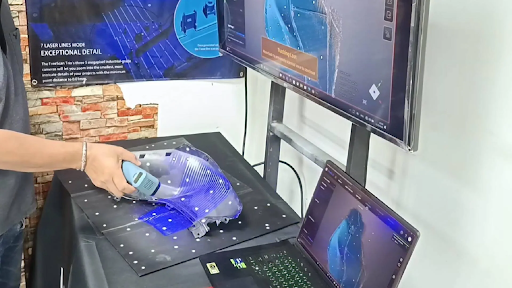


A repair studio receives a damaged plastic housing that is no longer sold as a replacement part. The team could recreate it manually, outsource the job, or scan the original as a design reference. If similar requests arrive regularly, buying a scanner may seem sensible. But a cheap 3d scanner is only a good purchase when ownership saves enough time and effort to justify its full cost.
For freelancers, makers, repair businesses, and small product teams, 3D scanning can bring useful work in-house. However, the device is only one part of the process, and its purchase price does not tell the whole story.
Let Your Projects Set the Requirements
Begin with the objects you expect to capture. Are they small mechanical parts, household items, footwear, vehicle components, or larger products? Do you need a visual reference, a model for 3D printing, or geometry for reverse engineering?
These needs are different. A scanner designed for small objects may be inconvenient for larger subjects. A device that records general shape may not capture enough detail for a precision component. Surface material matters too: glossy, transparent, and very dark objects can be difficult for some systems. Use a few real examples from your workload as your comparison criteria. They are more useful than headline specifications alone.
Costs That Do Not Appear on the Box
The advertised price is only the starting point. Consider whether your computer can process scan data, how much storage you will need, and whether the software includes essential tools. Some workflows require separate licences for alignment, mesh editing, or exporting files. Check that the output formats work with your existing design, CAD, or printing applications; otherwise, extra software or file conversions may add complexity. Time is another cost. A device that is difficult to learn, loses tracking often, or requires repeated captures can become expensive through lost working hours. Include training and technical support in your decision.
Measure Value Through Regular Use
Return to the repair studio. If it needs to scan one part every few months, outsourcing may be cheaper than purchasing equipment. If similar requests arrive several times a week, bringing capture in-house could reduce delays and give the team more control. Estimate how often scanning will be required, what external services currently cost, and how much time each job takes. Include the effort needed to prepare an object, capture it, process the data, and check the result.
A scan does not replace all design work. Geometry may still need cleaning, alignment, measurement checks, or conversion into editable CAD features. Value comes from improving the workflow, not expecting the device to finish the job automatically.
Test the Workflow Before Committing
A practical trial can reveal more than a specification sheet. Choose an object similar to the work you expect to handle and assess the entire process, from capture to final output. Does the scanner track the object reliably? Can it record the areas that matter? How much editing is required? Does the software export a file your existing tools can open? Test a second object with different surface characteristics so one easy sample does not influence the decision too heavily.
Also review the warranty, documentation, software updates, and available support. A clear learning path can be particularly useful for first-time users. Brands such as EINSTAR offer dedicated 3d scanning equipment, but any model should be judged by whether it meets the requirements of your actual projects.
When Renting or Outsourcing Is the Better Option
Ownership is not always economical. If scanning is occasional, highly specialised, or requires accuracy beyond an entry-level device, a professional service may be a better choice. Outsourcing can also help when a project involves unusually large objects or challenging materials. Some businesses first outsource and track demand. This reveals how often scanning is needed and which capabilities would justify a purchase.
Make the Equipment Part of a Repeatable Process
Once you own a scanner, establish how files will be named, stored, reviewed, and shared. Keep original captures and check completed models consistently. Good organisation reduces rescanning and makes earlier data easier to retrieve.
Conclusion
Choosing a cheap 3D scanner should involve more than comparing prices or looking at technical specifications. The right equipment is one that handles your regular projects, works with your existing software, and fits comfortably within your budget. Before purchasing, consider the total ownership cost, test the scanning process, and compare it with the alternative of outsourcing. A little research beforehand can help you avoid unnecessary expenses and invest in equipment that remains useful as your work develops.
Frequently Asked Questions
Is a cheap 3D scanner suitable for a small business?
It can be suitable for basic capture, product references, and some 3D printing projects. Check that its working range, detail, and software meet your actual needs.
What extra costs should I consider?
Consider computer requirements, software licences, storage, accessories, training, maintenance, and the time required to process scans.
Can an affordable scanner capture every material?
No. Size, shape, surface finish, and required detail all affect results. Reflective, transparent, or very dark objects may need special preparation or different equipment.
Is buying better than using a scanning service?
Frequent, repeatable work may justify ownership. Occasional or specialised jobs may be less expensive to outsource. Compare expected usage with the full cost of owning the equipment.
Is a 3D scan automatically ready for printing?
Not always. The data may need alignment, cleaning, mesh repair, scaling, or additional CAD work before printing.