


VPN vs Incognito Mode: What’s the Difference?
Many people assume that opening an Incognito window provides the same privacy benefits as using a VPN. In reality, the two tools serve completely different purposes.
If you’re trying to improve your online privacy, it’s important to understand what each one does – and, just as importantly, what it doesn’t do.
What Does Incognito Mode Do?
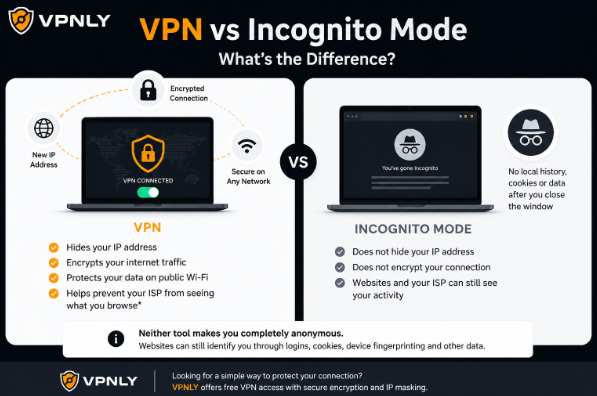
Incognito Mode (also called Private Browsing) is a browser feature that prevents your browsing activity from being stored on your device after you close the session.
Typically, it doesn’t save:
- browsing history;
- cookies after the session ends;
- form entries;
- temporary website data.
This is useful if you’re using a shared computer or simply don’t want your browser to remember your activity.
However, Incognito Mode does not make you anonymous online.
What Does a VPN Do?
A Virtual Private Network (VPN) works at the network level rather than inside your browser.
When connected to a VPN:
- your internet traffic is encrypted;
- your public IP address is replaced with the VPN server’s IP;
- websites see the VPN server instead of your internet provider’s IP address.
A VPN helps protect your connection, especially when using public Wi-Fi or accessing the internet from untrusted networks.
VPN vs Incognito Mode
What Neither Tool Does
Neither a VPN nor Incognito Mode can completely hide your online identity.
Websites may still recognize you if you:
- sign into your account;
- accept tracking cookies;
- use the same browser fingerprint;
- voluntarily share personal information.
Online privacy is built from multiple layers – not a single tool.
Which One Should You Use?
The answer depends on what you’re trying to accomplish.
Use Incognito Mode if you simply don’t want your browser to save local history or cookies after your session.
Use a VPN if your goal is to protect your internet connection, hide your public IP address, or improve privacy on public networks.
Many people use both together since they solve different problems.
Choosing a VPN
If you’re considering using a VPN, it’s worth selecting one that offers reliable encryption, stable connections, and a transparent privacy policy.
VPNLY is one option to consider if you’re looking for a free VPN. It provides encrypted connections and IP masking without a complicated setup, making it suitable for users who want an easy way to add another layer of privacy while browsing.
Final Thoughts
Incognito Mode and VPNs are often confused, but they are not interchangeable.
Incognito Mode protects your local privacy by preventing your browser from storing data on your device.
A VPN protects your network privacy by encrypting your connection and masking your public IP address.
Understanding this distinction helps you choose the right tool – and set realistic expectations about what each one can and cannot protect.